



Introduction
Choosing RFID tags for asset tracking and RFID asset tracking hardware is not a catalog exercise. The wrong tag may scan beautifully in a lab and fail on a metal cabinet, laptop, hospital device, outdoor container, or tool that gets cleaned, moved, stacked, dropped, or painted. Before selecting tags, understanding how asset tracking using RFID proves asset existence, location, and register accuracy helps teams define what the tag actually needs to do.
This guide helps enterprise teams choose RFID asset tags, labels, readers, and hardware architecture based on the job the system must perform: reliable asset identification, faster audits, controlled movement, custody evidence, and clean updates to the asset register.
In this guide, you will learn
- How to choose between passive RFID, active RFID, semi-passive tags, and UHF/RAIN RFID.
- Which RFID tags work best for metal assets, IT assets, outdoor equipment, hospital devices, tools, returnable assets, and documents.
- How handheld readers, fixed readers, portals, antennas, sled readers, and RFID printers fit different workflows.
- What to test before buying tags in bulk.
- How to commission RFID tags so finance, IT, and operations teams can trust the data.
- How country-specific frequency and sourcing differences affect RFID rollout in the USA, India, UK, Indonesia, and Germany.
What RFID hardware should you choose for asset tracking?
For most enterprise fixed asset audits, IT inventory checks, and multi-site asset verification, passive UHF or RAIN RFID tags work best because they support fast bulk reads at a scalable cost. Active RFID works better for high-value assets that need longer-range or more continuous location signals. On-metal, rugged, tamper-evident, or specialty labels become necessary when the asset surface or environment would make a standard RFID label unreliable.
TL;DR for procurement and implementation teams
Decision |
Practical answer |
| Best default for bulk asset audits | Passive UHF / RAIN RFID tags |
| Best for metal assets | On-metal RFID labels or hard tags tested on the actual asset surface |
| Best for laptops and IT assets | Low-profile RFID asset labels with barcode or QR fallback; test on metal surfaces and curved edges |
| Best for continuous location | Active RFID, BLE, or RTLS, depending on range, accuracy, battery policy, and infrastructure |
| Best reader for audits | Handheld RFID reader or mobile computer with RFID capability |
| Best reader for controlled movement | Fixed reader, portal, cabinet, shelf, or doorway read zone |
| Best label design | RFID inlay plus human-readable asset ID plus barcode or QR fallback |
| Biggest failure risk | Buying tags before testing surface, placement, read range, environment, and user workflow |
What are RFID asset tags, labels, and readers?
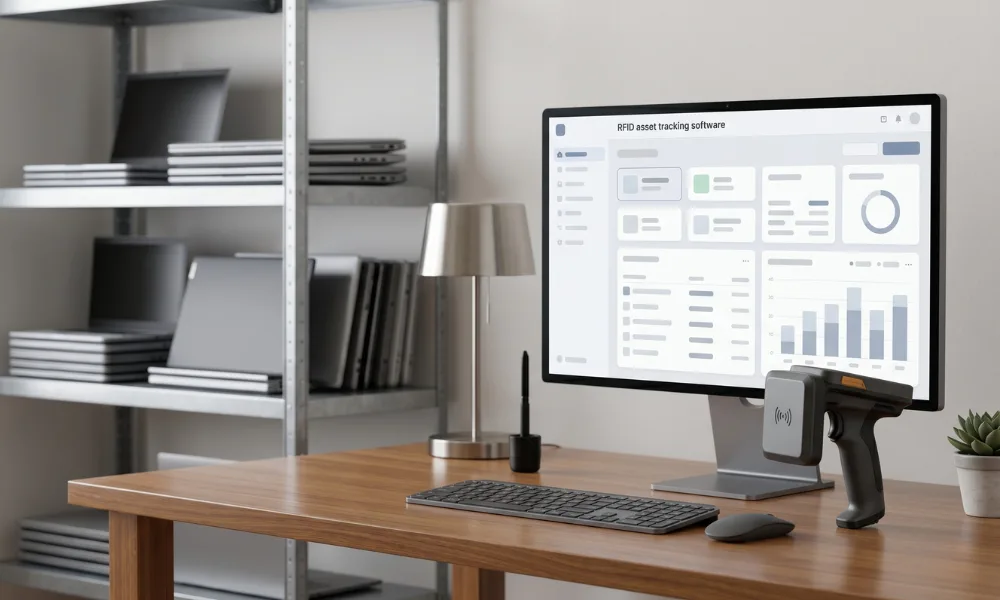
RFID asset tags are physical tags or labels attached to assets so an RFID reader can identify them using radio waves. Each tag carries a unique identifier that RFID asset tracking software links to a specific asset record, location, custodian, status, and audit history.
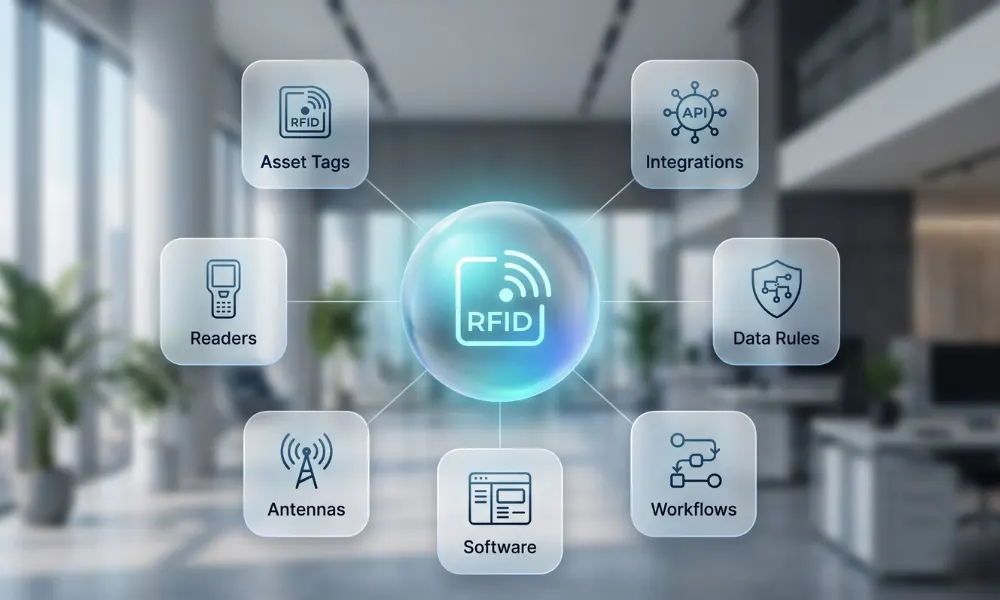
RFID hardware usually includes:
Hardware component |
What it does |
Enterprise selection question |
| RFID tag or inlay | Stores and transmits the unique identifier | Will the tag work on this material, in this environment, for the full useful life? |
| RFID label | Combines the RFID inlay with printable label material | Does the label also show human-readable ID and barcode or QR fallback? |
| Hard tag | Rugged physical tag for metal, outdoor, high-impact, or reusable assets | Can users mount it securely without damaging the asset? |
| RFID reader | Sends and receives radio signals from tags | Should scans happen by handheld sweep, fixed portal, cabinet, shelf, or vehicle-mounted reader? |
| Antenna | Shapes the read zone and signal direction | Will the antenna capture target tags without creating noisy stray reads? |
| RFID printer or encoder | Prints and encodes RFID labels | Can it encode, print, verify, and reject failed labels before deployment? |
| Asset tracking software | Associates tag reads with business events | Can the software turn reads into asset audits, movements, exceptions, and ERP updates? |
The FDA describes RFID as a wireless system made of tags and readers, with readers emitting radio waves and receiving signals from RFID tags. It also distinguishes passive tags, which draw power from the reader, from active tags, which use batteries. Zebra similarly notes that RFID uses radio waves rather than optical scanning and does not require direct line of sight, which makes it useful for inventory and asset tracking.
What matters most when choosing RFID tags for asset tracking?
The best RFID tags for asset tracking depend on the asset, not the tag catalog. Start with the asset’s business role, then match tag form factor, reader type, software workflow, and lifecycle rules.
The 8-factor RFID hardware fit model
Use these eight factors before you shortlist tag SKUs or reader models:
Factor |
Why it matters |
Example question |
| Asset material | Metal, liquid, glass, plastic, wood, and painted surfaces behave differently around RF signals | Is the tag mounted on metal, near liquid, or on a curved surface? |
| Environment | Heat, cold, moisture, UV, dust, chemicals, cleaning, abrasion, and impact affect tag survival | Will cleaning chemicals, outdoor weather, or vibration damage the label? |
| Read distance | A longer read range can help, but it can also create unwanted reads | Should users detect the asset from 30 cm, 3 m, 10 m, or across a yard? |
| Read workflow | Hardware must fit the way teams scan assets | Will users perform handheld audit sweeps or should a portal read movement automatically? |
| Audit frequency | More frequent audits justify more durable tags and easier scanning | Will the asset be verified monthly, quarterly, annually, or only at transfer? |
| Useful life | Long-life assets need tags that outlast the audit program | Does the tag need to last one year, five years, or the asset’s entire useful life? |
| Human fallback | Staff still need a way to identify assets when RFID is unavailable | Does the label include a human-readable asset ID and barcode or QR fallback? |
| Governance | The tag must connect to an approved asset record | Who can commission, replace, retire, or reassign a tag? |
An enterprise should choose RFID tags based on asset surface, environment, required read distance, scan workflow, tag lifespan, fallback identification, and control objective. Price matters, but read reliability and lifecycle governance matter more because failed tags create missing assets, bad audits, and duplicate tagging work.
Active vs passive RFID tags: which should you choose?
Passive RFID tags work best for most high-volume enterprise asset audits. Active RFID tags work best when a smaller set of high-value assets needs longer-range or more continuous location signals. Semi-passive or battery-assisted tags sit between those models when the tag needs a battery for sensing or improved performance but still depends on reader interaction.
RFID type |
Power source |
Typical enterprise fit |
Strength |
Watch-out |
| Passive RFID | No battery; powered by the reader signal | Fixed assets, IT assets, equipment audits, storerooms, documents, tools, returnable containers | Low unit cost, scalable, small form factors, strong for bulk inventory | Read range depends heavily on surface, placement, reader, and environment |
| Active RFID | A battery-powered tag broadcasts a signal | Vehicles, high-value mobile equipment, large yards, containers, mission-critical assets | Longer range and more continuous visibility | Higher cost, larger tag, battery management, infrastructure complexity |
| Semi-passive / battery-assisted RFID | Battery supports tag electronics, but the reader still triggers communication in many designs | Sensor-enabled or specialty asset use cases | Better sensing or performance for niche environments | More expensive and needs battery lifecycle governance |
When passive RFID is the right choice
Choose passive RFID asset tracking when the goal is fast verification or periodic location evidence rather than continuous real-time tracking. Passive tags usually fit:
- Annual or quarterly fixed asset audits.
- IT inventory sweeps for laptops, monitors, docking stations, servers, and networking gear.
- Multi-asset storeroom or tool-room checks.
- Manufacturing equipment and machinery verification.
- Hospital equipment inventory where continuous RTLS is not required.
- Returnable transport item checks at controlled points.
Passive RFID gives finance and operations teams a practical way to verify many assets quickly. However, passive RFID does not provide continuous location unless readers create enough controlled read events.
When active RFID is the right choice
Choose active RFID asset tracking when the value of continuous or long-range visibility outweighs tag cost and battery operations. Before committing, reviewing active RFID asset tracking cost alongside passive options helps teams build a realistic budget and ROI case before approaching vendors. Active tags may fit:
- High-value mobile equipment in large facilities.
- Yard assets, containers, trailers, and vehicles.
- Assets that cross controlled zones frequently.
- Assets where disappearance or downtime creates high operational risk.
- Use cases that need alerts without waiting for a handheld scan.
Active RFID should remain selective. If a team tags thousands of low-value assets with active tags just because active tags sound more advanced, the program often becomes expensive to maintain.
Active vs passive RFID decision rule
Use this simple rule:
- If the business question is, “Can we verify these assets quickly and accurately during audits or controlled movements?” choose passive RFID first.
- If the business question is, “Can we know when this high-value asset moves or leaves a zone without waiting for someone to scan it?” evaluate active RFID, BLE, or RTLS.
UHF, RAIN, HF, NFC, and LF RFID: Which frequency fits asset tracking?
UHF / RAIN RFID is the most common starting point for enterprise asset tracking because it supports longer read ranges and bulk reads. HF, NFC, and LF have useful roles, but they usually fit shorter-range, close-contact, access, authentication, or specialized environments.
RAIN Alliance describes RAIN as a standards-based wireless system where tags and readers implement ISO/IEC 18000-63, also known as GS1 UHF Gen2. That standardization matters because enterprise teams need tags, readers, printers, and software to interoperate across vendors and countries.
RFID frequency/family |
Typical asset tracking fit |
Use when |
Avoid when |
| UHF / RAIN RFID | Bulk inventory, fixed asset verification, IT audits, portals, warehouse, and plant assets | You need multi-tag reads and a practical read distance | You need tap-close interaction only or the environment makes UHF unreliable without redesign |
| HF RFID | Short-range identification and some regulated or specialized item workflows | You need more controlled short-range reads | You need fast, long-range bulk reads |
| NFC | Smartphone-enabled close-range reads | Users need phone-based interaction, identity checks, or service records | You need room-level or shelf-level bulk inventory |
| LF RFID | Specialty applications around animals, access, or environments where LF performs better | Short-range reliability matters more than read speed | You need high-volume asset audit sweeps |
| Active RFID / BLE / RTLS | Longer-range or continuous location signals | You need alerts, telemetry, or zone-level location | You only need periodic audit confirmation |
RFID tag selection by asset surface and environment
RFID tag performance changes when assets are metal, curved, exposed to chemicals, stored near liquid, stacked densely, or handled by many users. Therefore, tag selection should start with real asset classes, not generic labels.
Tag selection matrix by asset class
Asset class |
Recommended RFID tag/label |
Reader workflow |
Common failure risk |
What to test before rollout |
| Laptops and IT peripherals | Low-profile RFID asset label; barcode/QR fallback; on-metal design if required | Handheld reader for audits; mobile app fallback | Metal casing, curved edges, user removal, heat vents | Read from normal audit distance; adhesive after daily handling; placement that does not block vents |
| Servers and network devices | RFID label or on-metal tag, depending on the rack and chassis | Handheld reader in data center aisles | Dense metal racks and cable clutter | Read accuracy by rack position, aisle direction, and tag orientation |
| Plant machinery | Rugged on-metal tag or hard tag | Handheld audit sweep or fixed zone read | Metal interference, vibration, oil, dust, heat | Mounting method, read distance, cleaning exposure, maintenance access |
| Tools and toolboxes | Rugged hard tag, cable tie tag, or embedded tag | Handheld scan at issue/return or portal read at tool cage | Impact, abrasion, detachment, small surface area | Attachment strength, read when tools are stacked, stray reads near tool cage |
| Hospital equipment | Medical-grade or cleanable asset label; rugged tag for mobile equipment | Handheld audit, cabinet, or department sweep | Cleaning chemicals, curved plastic/metal, user removal | Cleaning survivability, read in wards, tag placement that does not affect clinical use |
| Outdoor containers and RTIs | Rugged UHF hard tag or reusable container tag | Fixed portal, dock door, yard scan | UV, rain, impact, stacking, long read zones | Weather exposure, portal read rates, duplicate/stray read filtering |
| Furniture and office assets | Standard RFID label or durable asset label | Handheld audit sweep | Poor adhesion, hidden placement, low asset value | Whether RFID is justified over barcode, read success during walk-through |
| Documents and files | Thin RFID label | Shelf, handheld, or cabinet reader | Dense stacking, orientation, and privacy concerns | Read rate in file stacks and cabinets; access control requirements |
| Vehicles or yard assets | Active RFID, rugged UHF, or hybrid with GPS, depending on use case | Gate reader, yard zone reader, or active beacon infrastructure | Range, weather, speed, cross-reads | Drive-through testing, reader zoning, battery lifecycle if active |
Metal assets
Metal can reflect and absorb RFID signals, which makes standard RFID labels unreliable on many metal surfaces. Use on-metal RFID tags or labels that include design features to handle metal interference. HID Global notes that on-metal RFID tags use specialized designs to maintain communication on metal surfaces and often support durable industrial use cases.
For metal assets, test:
- Whether the tag reads when mounted directly on the surface.
- Whether a spacer, foam layer, or hard tag improves reads.
- Whether the tag remains readable after vibration, cleaning, and temperature changes.
- Whether maintenance teams can see and avoid damaging the tag.
- Whether the chosen placement creates fewer stray reads from nearby assets.
Plastic, wood, painted surfaces, and furniture
Standard RFID labels often perform better on non-metal surfaces, but placement still matters. Adhesive quality, surface texture, dust, paint, cleaning, and user handling can still cause tag failure.
For office and furniture assets, teams should ask a cost-control question: Does RFID meaningfully improve the audit compared with barcode or QR? If the asset is low value, rarely moved, and easy to scan manually, the barcode may remain more cost-effective.
IT assets and laptops
IT assets create a tricky balance. Laptops, servers, monitors, network equipment, and peripherals need labels that stay readable without interfering with user comfort, heat vents, warranties, or service access.
For IT assets, use these rules:
- Put the human-readable ID and barcode or QR fallback on the label.
- Avoid vents, hinges, ports, rubber feet, service panels, and high-friction user contact areas.
- Test on metal and plastic versions of the same asset category.
- Check if the reader accidentally read assets in adjacent rooms, racks, or cabinets.
- Map RFID events to employee custody, assignment, return, repair, and disposal workflows in the software.
Outdoor and harsh environments
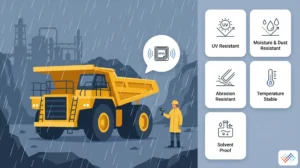
Outdoor and harsh environments need tags that survive real use, not only first-day scans. Look for resistance to UV, moisture, dust, abrasion, high or low temperature, solvents, and impact. For chemical plants, hospitals, laboratories, and manufacturing facilities, test the cleaning and maintenance cycle before bulk procurement.
Tamper-evident and security-sensitive assets
Some assets need tamper-evident labels, destructible labels, or secure mounting. However, tamper evidence solves a different problem than RFID read performance. A tag can be tamper-evident and still read poorly if the inlay, placement, or surface does not fit.
Use tamper-evident RFID labels when the asset has:
- High theft risk.
- Regulated custody needs.
- Sensitive IT or lab equipment.
- Frequent custodian changes.
- Audit exceptions caused by tag removal.
RFID reader selection for asset tracking
The right RFID reader depends on where the read should happen and who owns the workflow. A handheld reader helps teams search, audit, and verify. A fixed reader helps teams capture movement at a controlled read point. A printer or encoder helps teams produce reliable labels before field deployment.
Reader type comparison
Reader type |
Best for |
Strength |
Watch-out |
| Handheld RFID reader | Fixed asset audits, IT sweeps, room searches, exception checks | Flexible and practical for multi-site teams | Requires trained users and scanning SOP |
| RFID sled attached to a mobile device | Mobile teams that want RFID plus app workflows | Uses existing mobile workflow with RFID capability | Ergonomics, battery, and device compatibility matter |
| Fixed reader | Doorways, portals, cabinets, shelves, choke points, dock doors | Automates movement events | Requires read-zone design and stray-read filtering |
| Portal reader | Warehouses, tool cages, storerooms, RTI movement | Captures assets crossing a boundary | Can read unintended tags if not tuned carefully |
| Shelf or cabinet reader | Files, tools, medical supplies, controlled storage | Helps prove presence within a defined storage area | Higher infrastructure cost and tuning needs |
| RFID printer/encoder | Bulk tag production and commissioning | Prints, encodes, and validates labels | Requires label SKU control and failed-tag handling |
| Antenna | Signal shaping for fixed read zones | Controls coverage and direction | Bad antenna placement creates missed reads or noisy reads |
Zebra lists handheld, mobile, shelf, tabletop, doorway, and portal reader configurations as RFID options. That range matters because asset tracking teams rarely need one reader type for every use case.
Handheld readers: Best for audits and searches
Handheld RFID readers fit the most common AssetCues use cases: physical verification, IT asset inventory, plant audits, stockroom checks, and exception investigation. Users can walk a location, capture multiple assets, and let the software compare reads with expected asset lists.
Use handheld readers when:
- People already own the audit or verification workflow.
- Assets live across rooms, floors, offices, plants, or racks.
- The organization wants to pilot RFID before investing in fixed infrastructure.
- Teams need a search mode for missing assets.
Fixed readers and portals: best for controlled movement
Fixed readers work when an asset should create an event by crossing a defined boundary. Examples include tool cage exits, storeroom doors, dock doors, loading bays, file rooms, and hospital equipment pools.
Use fixed readers when:
- The location has a clear choke point.
- Movement events matter more than periodic audits.
- The team can tune the read zone and manage stray reads.
- The software can distinguish movement, presence, and exceptions.
RFID printers and encoders: best for controlled label production
RFID printers and encoders reduce commissioning errors because they can print the visible label, encode the RFID inlay, and verify that the tag responds. They help when the organization prints tags in batches, uses standardized label layouts, or needs to reject failed labels before teams attach them to assets.
Label design and human-readable data
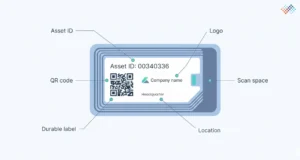
An RFID asset label should not rely on RFID alone. Enterprise users still need to identify assets when a reader is unavailable, a tag is damaged, or a user must resolve an exception in the field.
A strong RFID asset label includes:
- Human-readable asset ID.
- Barcode or QR fallback.
- Company name or logo, if useful for ownership identification.
- Optional asset class or location prefix.
- Durable material and adhesive matched to the surface.
- Enough quiet space around printed codes for reliable optical scanning.
- A label layout that keeps critical data visible after mounting.
Example label layout
Label zone |
Recommended content |
Purpose |
| Top line | Company or site identifier | Helps staff recognize ownership |
| Middle | Large asset ID | Supports manual verification |
| Code block | Barcode or QR fallback | Supports mobile scanning when RFID fails or is unavailable |
| RFID inlay area | Embedded and protected inlay | Enables wireless read |
| Optional note | “Do not remove” or service contact | Reduces tag loss and helps field users report damage |
How to choose RFID tags, labels, and readers in 9 steps
- Define the asset control objective- Decide whether RFID must prove existence, location, custody, authorized movement, equipment availability, audit completion, or utilization.
- Group assets by material and environment- Separate metal, plastic, IT, outdoor, medical, high-temperature, chemical-cleaning, and reusable assets.
- Choose the RFID model- Use passive UHF/RAIN for bulk inventory and audits; evaluate active RFID, BLE, or RTLS only when continuous or long-range location justifies the cost.
- Select tag form factors- Shortlist standard labels, on-metal labels, hard tags, cable-tie tags, tamper-evident labels, rugged tags, or embedded tags by asset class.
- Choose reader workflows- Match handheld readers to audits, fixed readers to movement zones, cabinet/shelf readers to controlled storage, and printers/encoders to label production.
- Design the visible label- Add a human-readable ID and barcode or QR fallback so users can resolve exceptions without RFID.
- Test on real assets. Measure read success by surface, orientation, distance, stacking, room layout, and user movement.
- Commission tags into software- Link each tag ID to the right asset record, location, custodian, status, and audit trail.
- Standardize hardware by asset class- Lock approved tag SKUs, reader models, placement rules, replacement workflow, and country-specific sourcing notes before scaling.
To choose RFID tags for asset tracking, group assets by surface and environment, choose passive or active RFID by read requirement, test tag placement on real assets, select handheld or fixed readers by workflow, print human-readable fallback codes, commission each tag in software, and standardize approved hardware by asset class.
Tag placement, testing, and failure prevention SOP
Poor placement causes many RFID failures. Read range should not be your only metric. HID Global explains that read range depends on factors such as antenna, reader signal, mounting material, surrounding material, embedded placement, and real-world conditions. Therefore, the tag that looks best on a spec sheet may not work best on your assets.
Tag placement checklist
Test |
What to check |
Pass condition |
| Surface test | Does the tag work on the actual material? | Reads reliably on the asset, not only in hand |
| Orientation test | Does tag orientation affect reads? | Reads from normal user direction and distance |
| Distance test | Does it read at the workflow distance? | Meets required read distance without excessive stray reads |
| Stacking test | Does it read when assets sit together? | Reads target assets in the way users store them |
| Environment test | Does heat, cold, moisture, dust, UV, or cleaning affect it? | Performs after realistic exposure |
| Adhesive/mount test | Does it stay attached? | Survives normal handling, cleaning, and maintenance |
| Stray-read test | Does the reader capture unrelated assets? | Software can filter events, or the read zone can be tuned |
| Fallback test | Can users still scan or read the printed ID? | Human-readable ID and barcode/QR remain visible |
Tag failure prevention SOP
Use this SOP before bulk deployment:
- Create an asset-class sample set- Include at least 10–20 representative assets from each major class, including difficult surfaces.
- Test at least two tag options per class- Include one conservative option for difficult surfaces.
- Attach tags using final placement rules- Do not test tags loosely in a user’s hand if they will be mounted on metal or plastic in production.
- Scan with the actual reader model- Use the reader power, software workflow, and user movement expected in the rollout.
- Record read success and stray reads- Track missed reads and unintended reads separately.
- Run environment exposure tests- Include cleaning, handling, stacking, movement, temperature, moisture, and vibration where relevant.
- Choose the tag by reliability, not by the lowest price- A cheap tag that fails after three months creates rework and audit exceptions.
- Document the approved placement- Add photos or diagrams to the tagging SOP.
- Define replacement rules- Decide how users report damaged tags, who approves retagging, and how the old tag ID gets retired.
- Review failure patterns monthly during rollout- Retire weak SKUs before they spread across more locations.
2026 angle: AI-assisted tag placement checks
In 2026, teams can improve tag placement quality by adding image-assisted checks to the tagging workflow. Field users can capture a photo of the tag after placement, and reviewers can compare it against approved placement examples for that asset class. This does not replace RF testing, but it helps standardize placement across countries, vendors, contractors, and shifts.
AssetCues can support this model by connecting tag commissioning, mobile field evidence, exception review, and audit-ready asset history in one workflow.
RFID tag commissioning and replacement workflow
Commissioning connects the physical tag to the digital asset record. Without commissioning, RFID hardware only produces tag reads; it does not create trustworthy asset data.
Commissioning workflow
Step |
Action |
Control outcome |
| 1 | Create or confirm the asset record | Prevents tagging assets that do not exist in the register |
| 2 | Print and encode the RFID label | Creates a controlled, unique tag ID |
| 3 | Attach tag using approved placement SOP | Reduces read failure and inconsistent fieldwork |
| 4 | Scan the tag and asset in the mobile app | Links the physical tag to the correct asset record |
| 5 | Capture a photo or placement evidence | Helps with audit and replacement review |
| 6 | Validate location, custodian, cost center, and status | Improves asset register quality |
| 7 | Approve exceptions | Prevents unreviewed changes from flowing into ERP or FAR |
| 8 | Sync with asset tracking software and enterprise systems | Makes RFID events useful beyond the field team |
Replacement workflow
A damaged or missing RFID tag should not create a duplicate asset or break the audit trail. Use a replacement workflow:
- User reports unreadable, damaged, or missing tag.
- System verifies asset identity using serial number, old barcode, photo, location, or custodian evidence.
- Authorized user retires the old tag ID.
- Authorized user commissions the new tag ID.
- System records replacement reason, user, date, location, and evidence.
- ERP, ITAM, CMMS, or fixed asset register receives only approved updates.
This control layer matters for finance and audit teams because tag replacement changes the identity bridge between the asset and the system of record.
Hardware cost drivers
RFID asset tags for asset tracking cost less when they are simple labels and more when they need rugged construction, on-metal performance, tamper evidence, long read range, sensors, active batteries, specialized adhesives, or certification. Reader costs depend on handheld vs fixed infrastructure, antenna count, portal design, RFID printer needs, and integration complexity.
RFID hardware cost drivers to include in procurement
Cost driver |
Why does it change the cost |
Cost-control advice |
| Tag form factor | Standard labels cost less than hard, rugged, active, or on-metal tags | Use the simplest tag that passes real-world testing |
| Surface difficulty | Metal, liquid, curves, heat, chemicals, and abrasion need specialty tags | Segment difficult assets instead of overbuying for every asset |
| Reader architecture | Fixed portals and cabinets need more design work than handheld readers | Start with handheld readers for audits unless movement automation is required |
| Printer/encoder | In-house label production adds hardware and process control | Use it when volume and governance justify it |
| Installation | Fixed readers need mounting, power, network, antennas, and tuning | Pilot read zones before installation at scale |
| Software integration | Hardware events must become approved business events | Avoid reader deployments that cannot update workflows or records |
| Battery lifecycle | Active tags need battery replacement and monitoring | Use active tags selectively for high-value assets |
| Country sourcing | Frequency bands and certifications differ by region | Buy region-appropriate readers and tags through approved partners |
Country-specific sourcing notes
RFID hardware selection must account for local regulations, available reader models, vendor support, and procurement channels. Do not assume a reader bought for one region will perform legally or optimally in another.
GS1 maintains an overview of UHF allocations across countries for RAIN RFID. Treat those allocations as a planning reference and verify final decisions with local regulatory guidance, reader certifications, and implementation partners before procurement.
Country |
Hardware planning note |
Country-Specific Positioning |
| USA | Validate FCC-compatible UHF reader models and tune power/read zones carefully in warehouses, IT rooms, hospitals, and plants. | “For US audit and operations teams, RFID hardware should support defensible evidence without creating noisy read events that auditors cannot interpret.” |
| India | Prioritize phased pilots, local hardware availability, on-metal tag testing for plant equipment, and cost transparency before bulk procurement. | “For Indian multi-site rollouts, the best RFID tag is the one the team can source consistently, test locally, and support across plants and offices.” |
| United Kingdom | Prioritize simple audit adoption, public-sector or healthcare accountability, and reader workflows that field teams can use without heavy retraining. | “For UK teams, the hardware decision should reduce fieldwork friction, not introduce a specialist-only process.” |
| Indonesia | Confirm local spectrum/device approvals, partner support, and environmental resilience for humidity, outdoor sites, and distributed operations. | “For Indonesia deployments, pilot the tags in the real site environment before importing large volumes of hardware.” |
| Germany | Prioritize industrial reliability, SAP/FAR alignment, privacy-aware read zones, and careful European frequency compliance. | “For German industrial teams, RFID hardware should prove controlled identity and movement while respecting strict process discipline and data governance.” |
How AssetCues helps teams choose RFID hardware without overbuying
AssetCues is not only a place to store tag IDs. The platform helps teams decide which RFID asset tags, labels, readers, and workflows make sense for each asset class before rollout.
AssetCues can support:
- Asset-class segmentation for RFID, barcode, QR, active RFID, and hybrid models.
- RFID tag commissioning with asset record validation.
- Mobile audit sweeps using RFID and fallback barcode/QR scanning.
- Exception workflows for missing, mismatched, damaged, or retagged assets.
- Movement evidence, custodian records, and approval logs.
- ERP, ITAM, CMMS, and fixed asset register synchronization.
- Multi-location rollout governance across plants, offices, hospitals, and warehouses.
Key takeaways
- Passive UHF / RAIN RFID is the best default for bulk asset tracking and fixed asset audits, but it still needs real-world tag testing.
- Active RFID works best for selected high-value or long-range location use cases, not for every asset.
- Metal, liquids, cleaning, outdoor exposure, curved surfaces, and dense stacking can break RFID performance if teams use generic labels.
- Handheld readers fit audit sweeps and searches; fixed readers fit controlled movement points.
- Every RFID label should include a human-readable ID and a barcode or QR fallback.
- Tag commissioning matters as much as tag selection because it connects the physical tag to the asset record.
- Country-specific frequency, certification, sourcing, and support differences should shape hardware procurement before global rollout.
Conclusion
RFID hardware choices shape the reliability of the entire asset tracking program. The best RFID asset tag is not the cheapest label or the longest-range tag on a spec sheet. It is the tag that reads reliably on the real asset, survives the real environment, supports the real workflow, and connects cleanly to the asset record.
For enterprise teams, the practical path is clear: segment assets, test tag placement, select the right reader workflow, add visible fallback codes, commission tags under control, and scale only after the pilot proves read reliability. That approach turns RFID asset tracking hardware into a dependable control layer for finance, IT, operations, and audit teams.

FAQs about RFID asset tags, readers, and labels
Q1: What RFID tags work on metal assets?
Ans: On-metal RFID tags work best on metal assets because they include designs that reduce metal interference. Standard RFID labels often perform poorly when mounted directly on metal equipment.
Q2: Can RFID tags be used outdoors?
Ans: Yes, RFID tags for asset tracking can be used outdoors when teams choose rugged tags designed for UV, moisture, temperature, abrasion, and impact. Outdoor tags should be tested on real assets before bulk procurement.
Q3: What is UHF RFID asset tracking?
Ans: UHF RFID asset tracking uses ultra-high-frequency radio waves to identify tagged assets. It is common in enterprise asset tracking because it supports practical read distance and bulk reads.
Q4: Are RFID locator tags the same as GPS trackers?
Ans: No. RFID locator tags identify assets when a reader detects them, while GPS trackers use satellite positioning for outdoor location. For indoor asset tracking, passive RFID, active RFID, BLE, or RTLS may fit better than GPS, depending on the required precision.